Total Pageviews

Showing posts with label Installation. Show all posts

Monday, 9 February 2015

[FATAL] [INS-41321] Invalid Oracle Cluster Registry (OCR) location

SEVERE: [FATAL] [INS-41321] Invalid Oracle Cluster Registry (OCR) location.


Check the installation log file . From the installation log we found :

CAUSE: The installer detects that the storage type of the location (/fst01/storage/ocr) is not supported for Oracle Cluster Registry.
ACTION: Provide a supported storage location for the Oracle Cluster Registry.
*ADDITIONAL INFORMATION:*
 - node2:Mount options did not meet the requirements for this platform
 [Expected ="rw|!ro,hard|!soft,suid|!nosuid,rsize>=32768,wsize>=32768,tcp|proto=tcp,v3|nfsv3|vers=3|nfsvers=3,timeo>=600,acregmin=0&acregmax=0&acdirmin=0&acdirmax=0|actimeo=0" ;
 Found = "rw,nosuid,relatime,vers=3,rsize=32768,wsize=32768,namlen=255,hard,noacl,proto=tcp,timeo=600,retrans=2,sec=sys,mountaddr=10.11.15.10,mountvers=3,mountport=4046,mountproto=tcp,local_lock=none,addr=10.11.15.10"]
 The problem occurred on nodes: node1,node2
 - Cause: Cause Of Problem Not Available
 - Action: User Action Not Available
 - node2:PRVG-0361 : Incorrect NFS mount options "nosuid" used for "netapp1.nfs.linuxbox.com":"/vol/nodehome" mounted on: "/fst01/storage" The problem occurred on nodes: node1,node2
 - Cause: Cause Of Problem Not Available
 - Action: User Action Not Available
Summary of the failed nodes
node2
node1


Solution : Issue is clearly mentioned in the installation log and recommendation is also included .
So just mount the shared storage with recommended options .

Before   : 
================== 
netapp1.nfs.linuxbox.com:/vol/nodehome /fs01 nfs vers=3,tcp,timeo=600,retrans=2,rsize=32768,wsize=32768,bg,hard,intr,nosuid,noacl 0 0 

Mount with below options to resolve the issue  : 
================== ========= ========= =========  

filer2.nfs.linuxbox.com:/vol/nodehome /fs01 nfs rw,rsize=32768,wsize=32768,hard,bg,nointr,vers=3,tcp,timeo=600,actimeo=0 


Friday, 6 February 2015

To download oracle software or patch using Wget on Linux box

To download oracle software or patch directly on client’s Linux server you may use the below steps :

1. Add  Cookies.txt Extension in your crome browser. You can get is from crome web store  https://chrome.google.com/webstore/detail/cookiestxt/njabckikapfpffapmjgojcnbfjonfjfg?hl=en
2. One extension  will be added to google crome on top right side of browser .
3. Go to the oracle download page , login using the metalink id and Accept License Agreement .and click on the software binary to start download on your machine .
4. Now capture the cookies by Clicking on Cookies.txt extension . It will show you something like below :

# HTTP Cookie File for domains related to oracle.com.
# This content may be downloaded or pasted into a cookies.txt file and used by wget
# Example:  wget -x --load-cookies cookies.txt http://www.oracle.com/technetwork/database/enterprise-edition/downloads/database12c-linux-download-2240591.html
#
www.oracle.com FALSE   /technetwork/database/enterprise-edition/downloads      FALSE   0       testSessionCookie      Enabled
.oracle.com    TRUE    /       FALSE   1425008363     s_nr    1422416363929
.support.oracle.com    TRUE    /       FALSE   1580104749     mos.notifications        false
.oracle.com    TRUE    /       FALSE   1425097299.611 Order_MarketingInfluencer        WWOUSEOGOOGLECOIN
.oracle.com    TRUE    /       FALSE   1425097299.611054        Order_MarketingCampaignSuccess WWOUSEOGOOGLECOIN
.oracle.com    TRUE    /       FALSE   1425097299.611086      p_mcc        WWOUSEOGOOGLECOIN:NA:WWOUSEOGOOGLECOIN
.oracle.com    TRUE    /       FALSE   1737865303     optimizelyEndUserId        oeu1422505303647r0.8225775167811662


5. Just click on the “downloaded” link to download the cookies.txt file on your PC .
6. Copy the cookies.txt file to client’s linux server in the directory where you want to download the oracle software .
7. Issue the below command to download :


[root@linux12c grid_12c]# wget -x --load-cookies cookies.txt http://download.oracle.com/otn/linux/oracle12c/121020/linuxamd64_12102_grid_1of2.zip

--2015-02-05 13:39:44--  http://download.oracle.com/otn/linux/oracle12c/121020/linuxamd64_12102_grid_1of2.zip
Resolving download.oracle.com... 64.145.87.72, 64.145.87.11
Connecting to download.oracle.com|64.145.87.72|:80... connected.
HTTP request sent, awaiting response... 302 Moved Temporarily
Location: https://edelivery.oracle.com/akam/otn/linux/oracle12c/121020/linuxamd64_12102_grid_1of2.zip [following]
--2015-02-05 13:39:44--  https://edelivery.oracle.com/akam/otn/linux/oracle12c/121020/linuxamd64_12102_grid_1of2.zip
Resolving edelivery.oracle.com... 23.76.230.140
Connecting to edelivery.oracle.com|23.76.230.140|:443... connected.
HTTP request sent, awaiting response... 302 Moved Temporarily
Location: http://download.oracle.com/otn/linux/oracle12c/121020/linuxamd64_12102_grid_1of2.zip?AuthParam=1423161704_f18babafa52442c5aec7ead56289003a [following]
--2015-02-05 13:39:44--  http://download.oracle.com/otn/linux/oracle12c/121020/linuxamd64_12102_grid_1of2.zip?AuthParam=1423161704_f18babafa52442c5aec7ead56289003a
Reusing existing connection to download.oracle.com:80.
HTTP request sent, awaiting response... 200 OK
Length: 1747043545 (1.6G) [application/zip]
Saving to: âdownload.oracle.com/otn/linux/oracle12c/121020/linuxamd64_12102_grid_1of2.zipâ

100%[=========================================================================================================================================================>] 1,747,043,545 11.0M/s   in 2m 43s

2015-02-05 13:42:35 (10.2 MB/s) - âdownload.oracle.com/otn/linux/oracle12c/121020/linuxamd64_12102_grid_1of2.zipâ

[root@linux12c grid_12c]# wget -x --load-cookies cookies.txt http://download.oracle.com/otn/linux/oracle12c/121020/linuxamd64_12102_grid_2of2.zip
--2015-02-05 13:45:11--  http://download.oracle.com/otn/linux/oracle12c/121020/linuxamd64_12102_grid_2of2.zip
Resolving download.oracle.com... 64.145.87.72, 64.145.87.11
Connecting to download.oracle.com|64.145.87.72|:80... connected.
HTTP request sent, awaiting response... 302 Moved Temporarily
Location: https://edelivery.oracle.com/akam/otn/linux/oracle12c/121020/linuxamd64_12102_grid_2of2.zip [following]
--2015-02-05 13:45:11--  https://edelivery.oracle.com/akam/otn/linux/oracle12c/121020/linuxamd64_12102_grid_2of2.zip
Resolving edelivery.oracle.com... 23.76.230.140
Connecting to edelivery.oracle.com|23.76.230.140|:443... connected.
HTTP request sent, awaiting response... 302 Moved Temporarily
Location: http://download.oracle.com/otn/linux/oracle12c/121020/linuxamd64_12102_grid_2of2.zip?AuthParam=1423162031_de94d7ea4c7ca02b6a1986593b23227a [following]
--2015-02-05 13:45:11--  http://download.oracle.com/otn/linux/oracle12c/121020/linuxamd64_12102_grid_2of2.zip?AuthParam=1423162031_de94d7ea4c7ca02b6a1986593b23227a
Reusing existing connection to download.oracle.com:80.
HTTP request sent, awaiting response... 200 OK
Length: 646972897 (617M) [application/zip]
Saving to: âdownload.oracle.com/otn/linux/oracle12c/121020/linuxamd64_12102_grid_2of2.zipâ

100%[===========================================================================================================================================================>] 646,972,897 4.57M/s   in 2m 5s

2015-02-05 13:47:19 (4.93 MB/s) - âdownload.oracle.com/otn/linux/oracle12c/121020/linuxamd64_12102_grid_2of2.zipâ

8. Verify the size of files downloaded and checksum : match the cksum with value from oracle website
 
Oracle Database 12c Release 1 Grid Infrastructure (12.1.0.2.0) for Linux x86-64
 
linuxamd64_12c_grid_1of2.zip (1,747,043,545 bytes) (cksum - 1194876808)
 
linuxamd64_12c_grid_2of2.zip (646,972,897 bytes) (cksum - 2519919927)


wget executes under directory /staging/grid_12c/ and Files will be downloaded under : /staging/grid_12c/download.oracle.com/otn/linux/oracle12c/121020

[root@linux12c 121020]# ls -lrth
total 2.3G
-rw-r--r--. 1 root root 1.7G Jul 11  2014 linuxamd64_12102_grid_1of2.zip
-rw-r--r--. 1 root root 618M Jul 11  2014 linuxamd64_12102_grid_2of2.zip
[root@linux12c 121020]#
[root@linux12c 121020]# cksum linuxamd64_12102_grid_1of2.zip
1194876808 1747043545 linuxamd64_12102_grid_1of2.zip
[root@linux12c 121020]# cksum linuxamd64_12102_grid_2of2.zip
2519919927 646972897 linuxamd64_12102_grid_2of2.zip
[root@linux12c 121020]# pwd
/staging/grid_12c/download.oracle.com/otn/linux/oracle12c/121020

Or we can use directly as below :

wget --http-user="myMetalinkID@xyz.com" --http-password="MyPassword" --output-document="p21419221_121020_Linux-x86-64_1of10.zip" "https://updates.oracle.com/Orion/Download/process_form/p21419221_121020_Linux-x86-64_1of10.zip?file_id=81606884&aru=19220015&userid=o-myMetalinkID@xyz.com&email=myMetalinkID@xyz.com&patch_password=&patch_file=p21419221_121020_Linux-x86-64_1of10.zip"


wget --http-user="myMetalinkID@xyz.com" --http-password="MyPassword" --output-document="p21419221_121020_Linux-x86-64_2of10.zip" "https://updates.oracle.com/Orion/Download/process_form/p21419221_121020_Linux-x86-64_2of10.zip?file_id=81606884&aru=19220015&userid=o-myMetalinkID@xyz.com&email=myMetalinkID@xyz.com&patch_password=&patch_file=p21419221_121020_Linux-x86-64_2of10.zip"

Sunday, 18 January 2015

[FATAL] [INS-00001] Unknown irrecoverable error during silent installation

If the response file for an 11.2  silent install uses a password that contains the character '%' (percent sign) , then the installation will fail with the following errors: 

SEVERE:Unknown environment variable: %1
[FATAL] [INS-00001] Unknown irrecoverable error
CAUSE: No additional information available.

Workaround:

Change any passwords in the response file that use the '%' character.

Tuesday, 30 December 2014

Migrating the Database from Filesystem to ASM


Check the existing location of all datafiles , redo and control files:

SQL> select name from v$database;

NAME
---------
DBORA

SQL> Archive log list;
Database log mode        Archive Mode
Automatic archival        Enabled
Archive destination        /home/oracle/arch/
Oldest online log sequence     1
Next log sequence to archive   3
Current log sequence        3
SQL> select file_name from dba_data_files;

FILE_NAME
--------------------------------------------------------------------------------
/u01/app/oracle/oradata/dbora/users01.dbf
/u01/app/oracle/oradata/dbora/undotbs01.dbf
/u01/app/oracle/oradata/dbora/sysaux01.dbf
/u01/app/oracle/oradata/dbora/system01.dbf

SQL> select file_name from dba_temp_files;

FILE_NAME
--------------------------------------------------------------------------------
/u01/app/oracle/oradata/dbora/temp01.dbf

SQL> select member from v$logfile;

MEMBER
--------------------------------------------------------------------------------
/u01/app/oracle/oradata/dbora/redo03.log
/u01/app/oracle/oradata/dbora/redo02.log
/u01/app/oracle/oradata/dbora/redo01.log

SQL>  show parameter spfile ;

NAME         TYPE  VALUE
------------------------------------ ----------- ------------------------------
spfile         string  /u01/app/oracle/product/11.2/d
       b_1/dbs/spfiledbora.ora
SQL> show parameter control_file ;

NAME         TYPE  VALUE
------------------------------------ ----------- ------------------------------
control_file_record_keep_time      integer  7
control_files        string  /u01/app/oracle/oradata/dbora/
       control01.ctl, /u01/app/oracle
       /fast_recovery_area/dbora/cont
       rol02.ctl


 Backup pfile and spfile:

SQL> create pfile='/home/oracle/pfile.ora' from spfile ;

File created.


[oracle@oracle arch]$ cd $ORACLE_HOME/dbs
[oracle@oracle dbs]$ ls

hc_dbora.dat  initdbora.ora  init.ora  lkDBORA  orapwdbora  spfiledbora.ora
[oracle@oracle dbs]$ cp spfiledbora.ora /home/oracle/spfiledbora.ora_bkp

Back up the datafiles to the ASM disk group.

The format clause specifies +DATA2, which is the name of the ASM disk group to be used for storing the database.

[oracle@oracle dbs]$ rman target /

Recovery Manager: Release 11.2.0.3.0 - Production on Mon Dec 29 17:38:21 2014

Copyright (c) 1982, 2011, Oracle and/or its affiliates.  All rights reserved.

connected to target database: DBORA (DBID=3262226103)

RMAN> RUN
{
  ALLOCATE CHANNEL dev1 DEVICE TYPE DISK;
  ALLOCATE CHANNEL dev2 DEVICE TYPE DISK;
 BACKUP AS COPY
 INCREMENTAL LEVEL 0
 DATABASE
 FORMAT '+DATA2'
 TAG 'ORA_ASM_MIGRATION';
 }

using target database control file instead of recovery catalog
allocated channel: dev1
channel dev1: SID=48 device type=DISK

allocated channel: dev2
channel dev2: SID=53 device type=DISK

Starting backup at 29-DEC-14
channel dev1: starting datafile copy
input datafile file number=00001 name=/u01/app/oracle/oradata/dbora/system01.dbf
channel dev2: starting datafile copy
input datafile file number=00002 name=/u01/app/oracle/oradata/dbora/sysaux01.dbf
output file name=+DATA2/dbora/datafile/sysaux.257.867606039 tag=ORA_ASM_MIGRATION RECID=1 STAMP=867606314
channel dev2: datafile copy complete, elapsed time: 00:05:38
channel dev2: starting datafile copy
input datafile file number=00003 name=/u01/app/oracle/oradata/dbora/undotbs01.dbf
output file name=+DATA2/dbora/datafile/undotbs1.258.867606335 tag=ORA_ASM_MIGRATION RECID=2 STAMP=867606350
channel dev2: datafile copy complete, elapsed time: 00:00:25
channel dev2: starting datafile copy
copying current control file
output file name=+DATA2/dbora/datafile/system.256.867606009 tag=ORA_ASM_MIGRATION RECID=3 STAMP=867606376
channel dev1: datafile copy complete, elapsed time: 00:06:32
channel dev1: starting datafile copy
input datafile file number=00004 name=/u01/app/oracle/oradata/dbora/users01.dbf
output file name=+DATA2/dbora/controlfile/backup.259.867606353 tag=ORA_ASM_MIGRATION RECID=4 STAMP=867606379
channel dev2: datafile copy complete, elapsed time: 00:00:29
channel dev2: starting incremental level 0 datafile backup set
channel dev2: specifying datafile(s) in backup set
including current SPFILE in backup set
channel dev2: starting piece 1 at 29-DEC-14
output file name=+DATA2/dbora/datafile/users.260.867606381 tag=ORA_ASM_MIGRATION RECID=5 STAMP=867606382
channel dev1: datafile copy complete, elapsed time: 00:00:05
channel dev2: finished piece 1 at 29-DEC-14
piece handle=+DATA2/dbora/backupset/2014_12_29/nnsnn0_ora_asm_migration_0.261.867606385 tag=ORA_ASM_MIGRATION comment=NONE
channel dev2: backup set complete, elapsed time: 00:00:07
Finished backup at 29-DEC-14
released channel: dev1
released channel: dev2

If block change tracking is enabled for the database, then optionally make a level 1 incremental backup that you can use later to recover the database copy.

SQL> select  status from   v$block_change_tracking ;
STATUS  
----------
DISABLED
In our case it was disabled . If enable take level1 DB inc backup as below:

RUN
{
  ALLOCATE CHANNEL dev1 DEVICE TYPE DISK;
  ALLOCATE CHANNEL dev2 DEVICE TYPE DISK;
  ALLOCATE CHANNEL dev3 DEVICE TYPE DISK;
  ALLOCATE CHANNEL dev4 DEVICE TYPE DISK;
  BACKUP INCREMENTAL LEVEL 1 
    FOR RECOVER OF COPY WITH TAG 'ORA_ASM_MIGRATION' 
    DATABASE;
}

If the database is in ARCHIVELOG mode, and if the database is open, then archive the online logs.

The following example uses the SQL command to archive the current redo logs:

RMAN> SQL "ALTER SYSTEM ARCHIVE LOG CURRENT";

SQL "ALTER SYSTEM ARCHIVE LOG CURRENT";

If the database instance is currently using a server parameter file, then back it up.

The following example backs up the server parameter file:

RMAN> BACKUP AS BACKUPSET SPFILE;

Starting backup at 29-DEC-14
allocated channel: ORA_DISK_1
channel ORA_DISK_1: SID=48 device type=DISK
channel ORA_DISK_1: starting full datafile backup set
channel ORA_DISK_1: specifying datafile(s) in backup set
including current SPFILE in backup set
channel ORA_DISK_1: starting piece 1 at 29-DEC-14
channel ORA_DISK_1: finished piece 1 at 29-DEC-14
piece handle=/u01/app/oracle/fast_recovery_area/DBORA/backupset/2014_12_29/o1_mf_nnsnf_TAG20141229T175459_bb2l0x3h_.bkp tag=TAG20141229T175459 comment=NONE
channel ORA_DISK_1: backup set complete, elapsed time: 00:00:04
Finished backup at 29-DEC-14


If block change tracking is enabled, then disable it.

The following command disables block change tracking:

RMAN> SQL "ALTER DATABASE DISABLE BLOCK CHANGE TRACKING";

RMAN> SQL "ALTER DATABASE FLASHBACK OFF";

sql statement: ALTER DATABASE FLASHBACK OFF

RMAN> SHUTDOWN IMMEDIATE;

database closed
database dismounted
Oracle instance shut down

RMAN> STARTUP MOUNT;

connected to target database (not started)
Oracle instance started
database mounted

Total System Global Area     839282688 bytes

Fixed Size                     2233000 bytes
Variable Size                536874328 bytes
Database Buffers             297795584 bytes
Redo Buffers                   2379776 bytes

RMAN> RESTORE SPFILE TO '+DATA2/spfiledbora.ora';

Starting restore at 29-DEC-14
allocated channel: ORA_DISK_1
channel ORA_DISK_1: SID=18 device type=DISK

channel ORA_DISK_1: starting datafile backup set restore
channel ORA_DISK_1: restoring SPFILE
output file name=+DATA2/spfiledbora.ora
channel ORA_DISK_1: reading from backup piece /u01/app/oracle/fast_recovery_area/DBORA/backupset/2014_12_29/o1_mf_nnsnf_TAG20141229T175459_bb2l0x3h_.bkp
channel ORA_DISK_1: piece handle=/u01/app/oracle/fast_recovery_area/DBORA/backupset/2014_12_29/o1_mf_nnsnf_TAG20141229T175459_bb2l0x3h_.bkp tag=TAG20141229T175459
channel ORA_DISK_1: restored backup piece 1
channel ORA_DISK_1: restore complete, elapsed time: 00:00:07
Finished restore at 29-DEC-14

If the database is not using a server parameter file, then create one in ASM. Execute the CREATE SPFILE command in SQL*Plus as follows, where sid is the SID of the database (the command spans two lines):

SQL> CREATE SPFILE='+DATA/spfiledbora.ora' FROM PFILE='?/dbs/initsid.ora';

Afterward, delete spfiledbora.ora and initdbora.ora from the ?/dbs directory and 

Create a new initdbora.ora with the following line of content:

SPFILE='+DATA2/spfiledbora.ora'


RMAN> STARTUP MOUNT;

RMAN> SHUTDOWN IMMEDIATE;

database dismounted
Oracle instance shut down

 SQL> STARTUP FORCE NOMOUNT;

Oracle instance started

Total System Global Area     839282688 bytes

Fixed Size                     2233000 bytes
Variable Size                536874328 bytes
Database Buffers             297795584 bytes
Redo Buffers                   2379776 bytes


SQL> alter system set control_files='+DATA','+DATA2' scope=spfile;

System altered.

SQL>  alter system set db_create_file_dest='+DATA2' scope=spfile;

System altered.


SQL> startup nomount ;
ORACLE instance started.

Total System Global Area  839282688 bytes
Fixed Size      2233000 bytes
Variable Size    536874328 bytes
Database Buffers   297795584 bytes
Redo Buffers      2379776 bytes
SQL> show parameter control_file;

NAME         TYPE  VALUE
------------------------------------ ----------- ------------------------------
control_file_record_keep_time      integer  7
control_files        string  +DATA, +DATA2
SQL> 
RMAN> restore controlfile from '/u01/app/oracle/oradata/dbora/control01.ctl' ;

Starting restore at 29-DEC-14
using target database control file instead of recovery catalog
allocated channel: ORA_DISK_1
channel ORA_DISK_1: SID=24 device type=DISK

channel ORA_DISK_1: copied control file copy
output file name=+DATA/dbora/controlfile/current.256.867608667
output file name=+DATA2/dbora/controlfile/current.263.867608679
Finished restore at 29-DEC-14

RMAN> ALTER DATABASE MOUNT;

database mounted
released channel: ORA_DISK_1

RMAN> SWITCH DATABASE TO COPY;

datafile 1 switched to datafile copy "+DATA2/dbora/datafile/system.256.867606009"
datafile 2 switched to datafile copy "+DATA2/dbora/datafile/sysaux.257.867606039"
datafile 3 switched to datafile copy "+DATA2/dbora/datafile/undotbs1.258.867606335"
datafile 4 switched to datafile copy "+DATA2/dbora/datafile/users.260.867606381"

RMAN> RUN
{
  ALLOCATE CHANNEL dev1 DEVICE TYPE DISK;
  ALLOCATE CHANNEL dev2 DEVICE TYPE DISK;
  ALLOCATE CHANNEL dev3 DEVICE TYPE DISK;
  ALLOCATE CHANNEL dev4 DEVICE TYPE DISK;
  RECOVER DATABASE;
}

allocated channel: dev1
channel dev1: SID=24 device type=DISK

allocated channel: dev2
channel dev2: SID=26 device type=DISK

allocated channel: dev3
channel dev3: SID=27 device type=DISK

allocated channel: dev4
channel dev4: SID=28 device type=DISK

Starting recover at 29-DEC-14
starting media recovery
media recovery complete, elapsed time: 00:01:05

Finished recover at 29-DEC-14
released channel: dev1
released channel: dev2
released channel: dev3
released channel: dev4

RMAN> ALTER DATABASE OPEN;

database opened

QL> select file_name from dba_data_files;

FILE_NAME
--------------------------------------------------------------------------------
+DATA2/dbora/datafile/users.260.867606381
+DATA2/dbora/datafile/undotbs1.258.867606335
+DATA2/dbora/datafile/sysaux.257.867606039
+DATA2/dbora/datafile/system.256.867606009

SQL> select file_name from dba_temp_files;

FILE_NAME
--------------------------------------------------------------------------------
/u01/app/oracle/oradata/dbora/temp01.dbf

SQL> select member from v$logfile;

MEMBER
--------------------------------------------------------------------------------
/u01/app/oracle/oradata/dbora/redo03.log
/u01/app/oracle/oradata/dbora/redo02.log
/u01/app/oracle/oradata/dbora/redo01.log

SQL> show parameter spfile ;

NAME         TYPE  VALUE
------------------------------------ ----------- ------------------------------
spfile         string  /u01/app/oracle/product/11.2/d
       b_1/dbs/spfiledbora.ora
SQL> show parameter control_file ;

NAME         TYPE  VALUE
------------------------------------ ----------- ------------------------------
control_file_record_keep_time      integer  7
control_files        string  +DATA/dbora/controlfile/curren
       t.256.867608667, +DATA2/dbora/
       controlfile/current.263.867608
       679

 SQL> ALTER TABLESPACE TEMP ADD TEMPFILE ;

Tablespace altered.

SQL> select file_name from dba_temp_files;

FILE_NAME
--------------------------------------------------------------------------------
+DATA2/dbora/tempfile/temp.264.867609077


SQL> SET SERVEROUTPUT ON;
DECLARE
   CURSOR rlc IS
      SELECT GROUP# GRP, THREAD# THR, BYTES, 'NO' SRL
      FROM   V$LOG
      UNION
      SELECT GROUP# GRP, THREAD# THR, BYTES, 'YES' SRL
      FROM   V$STANDBY_LOG
      ORDER BY 1;
   stmt     VARCHAR2(2048);
BEGIN
   FOR rlcRec IN rlc LOOP
      IF (rlcRec.srl = 'YES') THEN
         stmt := 'ALTER DATABASE ADD STANDBY LOGFILE THREAD ' ||
                 rlcRec.thr || ' SIZE ' || rlcRec.bytes;
         EXECUTE IMMEDIATE stmt;
         stmt := 'ALTER DATABASE DROP STANDBY LOGFILE GROUP ' || rlcRec.grp;
         EXECUTE IMMEDIATE stmt;
      ELSE
         stmt := 'ALTER DATABASE ADD LOGFILE THREAD ' ||
                 rlcRec.thr || ' SIZE ' ||  rlcRec.bytes;
         EXECUTE IMMEDIATE stmt;
         BEGIN
            stmt := 'ALTER DATABASE DROP LOGFILE GROUP ' || rlcRec.grp;
            DBMS_OUTPUT.PUT_LINE(stmt);
            EXECUTE IMMEDIATE stmt;
         EXCEPTION
            WHEN OTHERS THEN
               EXECUTE IMMEDIATE 'ALTER SYSTEM SWITCH LOGFILE';
               EXECUTE IMMEDIATE 'ALTER SYSTEM CHECKPOINT GLOBAL';
               EXECUTE IMMEDIATE stmt;
         END;
      END IF;
   END LOOP;
END;
/SQL>     

ALTER DATABASE DROP LOGFILE GROUP 1
ALTER DATABASE DROP LOGFILE GROUP 2
ALTER DATABASE DROP LOGFILE GROUP 3

PL/SQL procedure successfully completed.

SQL> SQL> select member from v$logfile;

MEMBER
--------------------------------------------------------------------------------
+DATA2/dbora/onlinelog/group_2.269.867609239
+DATA2/dbora/onlinelog/group_1.267.867609167
+DATA2/dbora/onlinelog/group_4.265.867609139
+DATA2/dbora/onlinelog/group_4.266.867609151
+DATA2/dbora/onlinelog/group_1.268.867609179
+DATA2/dbora/onlinelog/group_2.270.867609251

Back up archived redo log files, backup sets, and data file copies to Oracle ASM. For example, run the following command at the RMAN prompt:

RMAN> RUN
{
  ALLOCATE CHANNEL dev1 DEVICE TYPE DISK;
  ALLOCATE CHANNEL dev2 DEVICE TYPE DISK;
  ALLOCATE CHANNEL dev3 DEVICE TYPE DISK;
  ALLOCATE CHANNEL dev4 DEVICE TYPE DISK;

  BACKUP AS COPY ARCHIVELOG ALL DELETE INPUT;
  BACKUP BACKUPSET ALL DELETE INPUT;
  BACKUP AS COPY DATAFILECOPY ALL DELETE INPUT;
}

using target database control file instead of recovery catalog
allocated channel: dev1
channel dev1: SID=58 device type=DISK

allocated channel: dev2
channel dev2: SID=59 device type=DISK

allocated channel: dev3
channel dev3: SID=60 device type=DISK

allocated channel: dev4
channel dev4: SID=61 device type=DISK

Starting backup at 29-DEC-14
current log archived
channel dev1: starting archived log copy
input archived log thread=1 sequence=3 RECID=1 STAMP=867606655
channel dev2: starting archived log copy
input archived log thread=1 sequence=4 RECID=2 STAMP=867606867
channel dev3: starting archived log copy
input archived log thread=1 sequence=5 RECID=3 STAMP=867609204
channel dev4: starting archived log copy
input archived log thread=1 sequence=6 RECID=4 STAMP=867609456
output file name=+DATA2/dbora/archivelog/2014_12_29/thread_1_seq_4.272.867609463 RECID=5 STAMP=867609472
channel dev2: archived log copy complete, elapsed time: 00:00:21
channel dev2: deleting archived log(s)
archived log file name=/home/oracle/arch/arch_1_4_867594243.arc RECID=2 STAMP=867606867
output file name=+DATA2/dbora/archivelog/2014_12_29/thread_1_seq_5.273.867609467 RECID=6 STAMP=867609476
channel dev3: archived log copy complete, elapsed time: 00:00:20
channel dev3: deleting archived log(s)
archived log file name=/home/oracle/arch/arch_1_5_867594243.arc RECID=3 STAMP=867609204
output file name=+DATA2/dbora/archivelog/2014_12_29/thread_1_seq_6.274.867609471 RECID=7 STAMP=867609479
channel dev4: archived log copy complete, elapsed time: 00:00:18
channel dev4: deleting archived log(s)
archived log file name=/home/oracle/arch/arch_1_6_867594243.arc RECID=4 STAMP=867609456
output file name=+DATA2/dbora/archivelog/2014_12_29/thread_1_seq_3.271.867609459 RECID=8 STAMP=867609488
channel dev1: archived log copy complete, elapsed time: 00:00:37
channel dev1: deleting archived log(s)
archived log file name=/home/oracle/arch/arch_1_3_867594243.arc RECID=1 STAMP=867606655
Finished backup at 29-DEC-14

Starting backup at 29-DEC-14
channel dev1: input backup set: count=6, stamp=867606384, piece=1
channel dev1: starting piece 1 at 29-DEC-14
channel dev1: backup piece +DATA2/dbora/backupset/2014_12_29/nnsnn0_ora_asm_migration_0.261.867606385
channel dev2: input backup set: count=7, stamp=867606900, piece=1
channel dev2: starting piece 1 at 29-DEC-14
channel dev2: backup piece /u01/app/oracle/fast_recovery_area/DBORA/backupset/2014_12_29/o1_mf_nnsnf_TAG20141229T175459_bb2l0x3h_.bkp
piece handle=+DATA2/dbora/backupset/2014_12_29/nnnnf0_0.276.867609507 comment=NONE
channel dev1: finished piece 1 at 29-DEC-14
channel dev1: backup piece complete, elapsed time: 00:00:07
deleted backup piece
backup piece handle=+DATA2/dbora/backupset/2014_12_29/nnsnn0_ora_asm_migration_0.261.867606385 RECID=1 STAMP=867606384
piece handle=+DATA2/dbora/backupset/2014_12_29/nnnnf0_0.275.867609507 comment=NONE
channel dev2: finished piece 1 at 29-DEC-14
channel dev2: backup piece complete, elapsed time: 00:00:09
deleted backup piece
backup piece handle=/u01/app/oracle/fast_recovery_area/DBORA/backupset/2014_12_29/o1_mf_nnsnf_TAG20141229T175459_bb2l0x3h_.bkp RECID=2 STAMP=867606900
Finished backup at 29-DEC-14

Starting backup at 29-DEC-14
channel dev1: starting datafile copy
input is copy of datafile 00001: /u01/app/oracle/oradata/dbora/system01.dbf
channel dev2: starting datafile copy
input is copy of datafile 00002: /u01/app/oracle/oradata/dbora/sysaux01.dbf
channel dev3: starting datafile copy
input is copy of datafile 00003: /u01/app/oracle/oradata/dbora/undotbs01.dbf
channel dev4: starting datafile copy
input is copy of datafile 00004: /u01/app/oracle/oradata/dbora/users01.dbf
output file name=+DATA2/dbora/datafile/users.279.867609541 RECID=10 STAMP=867609562
channel dev4: datafile copy complete, elapsed time: 00:00:40
deleted datafile copy
datafile copy file name=/u01/app/oracle/oradata/dbora/users01.dbf RECID=9 STAMP=867608773
output file name=+DATA2/dbora/datafile/undotbs1.278.867609533 RECID=11 STAMP=867609567
channel dev3: datafile copy complete, elapsed time: 00:00:54
deleted datafile copy
datafile copy file name=/u01/app/oracle/oradata/dbora/undotbs01.dbf RECID=8 STAMP=867608771
output file name=+DATA2/dbora/datafile/sysaux.277.867609525 RECID=12 STAMP=867609831
channel dev2: datafile copy complete, elapsed time: 00:05:13
deleted datafile copy
datafile copy file name=/u01/app/oracle/oradata/dbora/sysaux01.dbf RECID=7 STAMP=867608769
output file name=+DATA2/dbora/datafile/system.261.867609525 RECID=13 STAMP=867609859
channel dev1: datafile copy complete, elapsed time: 00:05:37
deleted datafile copy
datafile copy file name=/u01/app/oracle/oradata/dbora/system01.dbf RECID=6 STAMP=867608768
Finished backup at 29-DEC-14
released channel: dev1
released channel: dev2
released channel: dev3
released channel: dev4


RMAN> report schema ;


using target database control file instead of recovery catalog
Report of database schema for database with db_unique_name DBORA

List of Permanent Datafiles
===========================
File Size(MB) Tablespace           RB segs Datafile Name
---- -------- -------------------- ------- ------------------------
1    700      SYSTEM               ***     +DATA2/dbora/datafile/system.256.867606009
2    550      SYSAUX               ***     +DATA2/dbora/datafile/sysaux.257.867606039
3    35       UNDOTBS1             ***     +DATA2/dbora/datafile/undotbs1.258.867606335
4    5        USERS                ***     +DATA2/dbora/datafile/users.260.867606381

List of Temporary Files
=======================
File Size(MB) Tablespace           Maxsize(MB) Tempfile Name
---- -------- -------------------- ----------- --------------------
1    100      TEMP                 32767       +DATA2/dbora/tempfile/temp.264.867609077

Friday, 26 December 2014

Create Asm diskgroups using ASMCA


Check the disks on both nodes node1 and node2 using the below command : 

[root@node1 ~]# oracleasm listdisks
DATA
FRA
OCR_VOTE

[root@node2 ~]# oracleasm listdisks
DATA
FRA
OCR_VOTE

Now login to grid user on node1 or node2 and run the command .

[grid@node1] asmca


click on create -->

Disk Group Name       : DATA
Redundancy                :External
Select Member Disks: Eligible
Select the disk path : /dev/oracleasm/disks/DATA and click OK


click on create -->

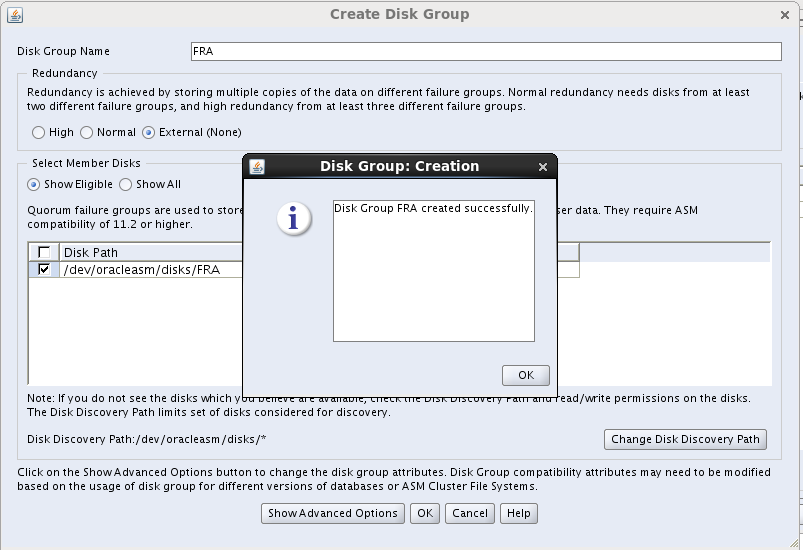
Disk Group Name       : FRA
Redundancy                :External
Select Member Disks: Eligible
Select the disk path : /dev/oracleasm/disks/FRA and click OK


SQL> select name,total_mb/1024 "total_gb" , free_mb/1024 "free_gb" from v$asm_diskgroup;

NAME total_gb                 free_gb
-------------------------------------------------------------------
OCR_VOTE         5.77539063        5.48535156
FRA          3.1015625         2.77832031
DATA          6.19628906       2.50585938

SQL> select MOUNT_STATUS,HEADER_STATUS,MODE_STATUS,OS_MB,TOTAL_MB,FREE_MB, NAME from v$asm_disk ;

MOUNT_S    HEADER_STATU  MODE_ST  OS_MB   TOTAL_MB    FREE_MB NAME
------- ------------ ------- -------- ---------- ---------- ---------- ------------------------------ ----------------------
CACHED MEMBER         ONLINE        3176       3176                2845      FRA_0000  
CACHED MEMBER         ONLINE         6345       6345                 2556      DATA_0000
CACHED MEMBER         ONLINE          5914       5914                  5617  OCR_VOTE_0000  

SQL>

Create Shareable ASM disks on Oracle virtual box

Create 3 shared disks for ASM:
========================

Power off both node1 and node2 .

Add 3 new disks on node1 and make them shareable . After that add these disks to node2 also .

Settings->storage->Controller:SATA-Add disk -> Create new disk


Hard Drive file type = VDI


Storage on physical hard drive = Fixed sized


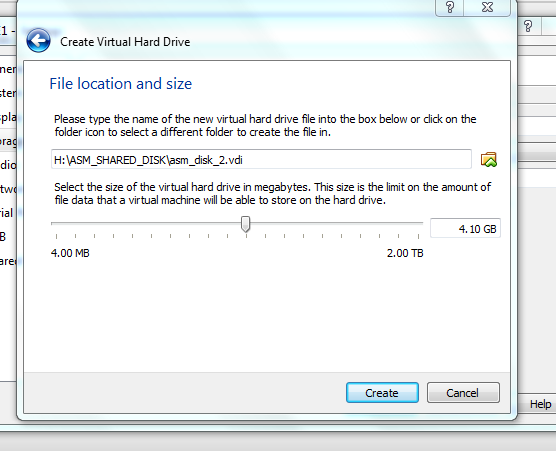
File Location and Size : H:\ASM_SHARED_DISK\asm_disk_1.vdi

Similarly create 2 mode asm diks "asm_disk_2.vdi" and "asm_disk_3.vdi" screenshots below:


Storage : After Adding 3 asm_disks.


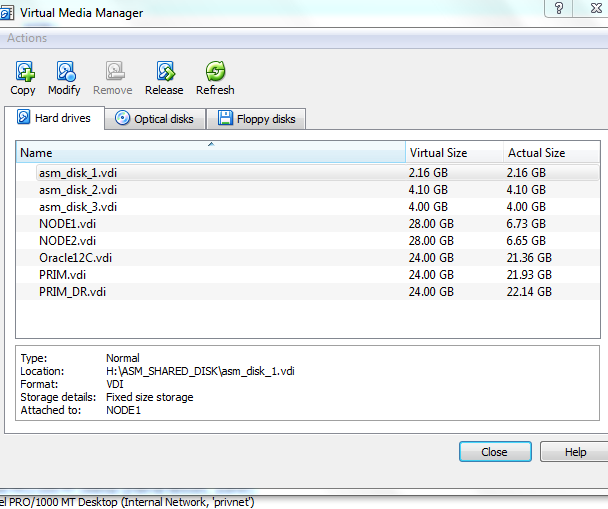
Now we need to make these asm disks sharable. Open Virtual Media Manager -

Select asm_disk_1 -> Click on Modify ->


Select asm_disk_1 -> Click on Modify -> Shareable -> ok


 Repeat the above for other 2 disks:

Select asm_disk_2  -> Click on Modify -> Shareable -> ok
Select asm_disk_3 -> Click on Modify -> Shareable -> ok

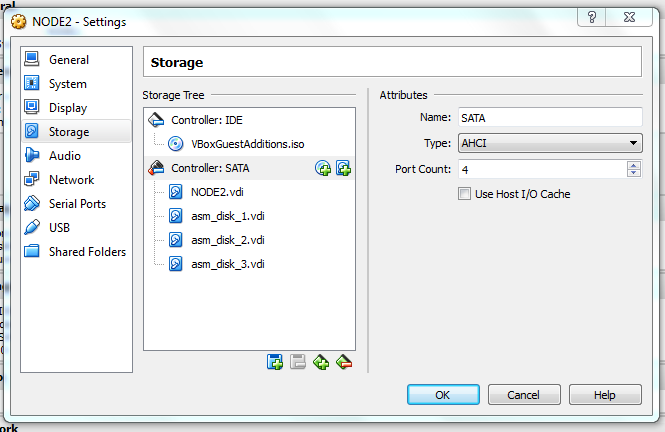
Attach these shareable "ask_disks_*"  existing disk to node2 VM using "Storage" page. Don't forget to select correct controller before attaching the disk and use "Choose existing disk" option.

on node 2 add shareable disks screenshot below:

Settings->storage->Controller:SATA->Add disks ->choose existing diks


[root@node1 ~]# fdisk /dev/sdb
Device contains neither a valid DOS partition table, nor Sun, SGI or OSF disklabel
Building a new DOS disklabel with disk identifier 0x81d9944a.
Changes will remain in memory only, until you decide to write them.
After that, of course, the previous content won't be recoverable.

Warning: invalid flag 0x0000 of partition table 4 will be corrected by w(rite)

WARNING: DOS-compatible mode is deprecated. It's strongly recommended to
         switch off the mode (command 'c') and change display units to
         sectors (command 'u').

Command (m for help): n
Command action
   e   extended
   p   primary partition (1-4)
p
Partition number (1-4): 1
First cylinder (1-281, default 1):
Using default value 1
Last cylinder, +cylinders or +size{K,M,G} (1-281, default 281):
Using default value 281

Command (m for help): w
The partition table has been altered!

Calling ioctl() to re-read partition table.
Syncing disks.


[root@node1 ~]# fdisk /dev/sdc
Device contains neither a valid DOS partition table, nor Sun, SGI or OSF disklabel
Building a new DOS disklabel with disk identifier 0xdd8c70c4.
Changes will remain in memory only, until you decide to write them.
After that, of course, the previous content won't be recoverable.

Warning: invalid flag 0x0000 of partition table 4 will be corrected by w(rite)

WARNING: DOS-compatible mode is deprecated. It's strongly recommended to
         switch off the mode (command 'c') and change display units to
         sectors (command 'u').

Command (m for help): n
Command action
   e   extended
   p   primary partition (1-4)
p
Partition number (1-4): 1
First cylinder (1-535, default 1):
Using default value 1
Last cylinder, +cylinders or +size{K,M,G} (1-535, default 535):
Using default value 535

Command (m for help): w
The partition table has been altered!

Calling ioctl() to re-read partition table.
Syncing disks.
[root@node1 ~]#
[root@node1 ~]# fdisk /dev/sdd
Device contains neither a valid DOS partition table, nor Sun, SGI or OSF disklabel
Building a new DOS disklabel with disk identifier 0x104efb19.
Changes will remain in memory only, until you decide to write them.
After that, of course, the previous content won't be recoverable.

Warning: invalid flag 0x0000 of partition table 4 will be corrected by w(rite)

WARNING: DOS-compatible mode is deprecated. It's strongly recommended to
         switch off the mode (command 'c') and change display units to
         sectors (command 'u').

Command (m for help): n
Command action
   e   extended
   p   primary partition (1-4)
p
Partition number (1-4): 1
First cylinder (1-522, default 1):
Using default value 1
Last cylinder, +cylinders or +size{K,M,G} (1-522, default 522):
Using default value 522

Command (m for help): w
The partition table has been altered!

Calling ioctl() to re-read partition table.
Syncing disks.


Check Permission of disks :

[root@oracle11g ~]# ls -lrth /dev/sd*
brw-rw---- 1 root disk 8,  0 Jan 11 12:25 /dev/sda
brw-rw---- 1 root disk 8,  2 Jan 11 12:25 /dev/sda2
brw-rw---- 1 root disk 8,  1 Jan 11 12:25 /dev/sda1
brw-rw---- 1 root disk 8, 48 Jan 11 18:12 /dev/sdd
brw-rw---- 1 root disk 8, 16 Jan 11 18:12 /dev/sdb
brw-rw---- 1 root disk 8, 32 Jan 11 18:12 /dev/sdc
brw-rw---- 1 root disk 8, 49 Jan 11 18:12 /dev/sdd1
brw-rw---- 1 root disk 8, 17 Jan 11 18:12 /dev/sdb1
brw-rw---- 1 root disk 8, 33 Jan 11 18:12 /dev/sdc1
[root@oracle11g ~]#
[root@oracle11g ~]# fdisk -l

Disk /dev/sda: 25.8 GB, 25769803776 bytes
255 heads, 63 sectors/track, 3133 cylinders
Units = cylinders of 16065 * 512 = 8225280 bytes
Sector size (logical/physical): 512 bytes / 512 bytes
I/O size (minimum/optimal): 512 bytes / 512 bytes
Disk identifier: 0x000beb7a

   Device Boot      Start         End      Blocks   Id  System
/dev/sda1   *           1          64      512000   83  Linux
Partition 1 does not end on cylinder boundary.
/dev/sda2              64        3134    24652800   8e  Linux LVM

Disk /dev/sdb: 3221 MB, 3221225472 bytes
255 heads, 63 sectors/track, 391 cylinders
Units = cylinders of 16065 * 512 = 8225280 bytes
Sector size (logical/physical): 512 bytes / 512 bytes
I/O size (minimum/optimal): 512 bytes / 512 bytes
Disk identifier: 0xe961556e

   Device Boot      Start         End      Blocks   Id  System
/dev/sdb1               1         391     3140676   83  Linux

Disk /dev/sdc: 5754 MB, 5754306560 bytes
255 heads, 63 sectors/track, 699 cylinders
Units = cylinders of 16065 * 512 = 8225280 bytes
Sector size (logical/physical): 512 bytes / 512 bytes
I/O size (minimum/optimal): 512 bytes / 512 bytes
Disk identifier: 0x12fdc659

   Device Boot      Start         End      Blocks   Id  System
/dev/sdc1               1         699     5614686   83  Linux

Disk /dev/sdd: 5754 MB, 5754306560 bytes
255 heads, 63 sectors/track, 699 cylinders
Units = cylinders of 16065 * 512 = 8225280 bytes
Sector size (logical/physical): 512 bytes / 512 bytes
I/O size (minimum/optimal): 512 bytes / 512 bytes
Disk identifier: 0xeeb628c4

   Device Boot      Start         End      Blocks   Id  System
/dev/sdd1               1         699     5614686   83  Linux

Disk /dev/mapper/vg_sumit-lv_root: 23.7 GB, 23668457472 bytes
255 heads, 63 sectors/track, 2877 cylinders
Units = cylinders of 16065 * 512 = 8225280 bytes
Sector size (logical/physical): 512 bytes / 512 bytes
I/O size (minimum/optimal): 512 bytes / 512 bytes
Disk identifier: 0x00000000


Disk /dev/mapper/vg_sumit-lv_swap: 1572 MB, 1572864000 bytes
255 heads, 63 sectors/track, 191 cylinders
Units = cylinders of 16065 * 512 = 8225280 bytes
Sector size (logical/physical): 512 bytes / 512 bytes
I/O size (minimum/optimal): 512 bytes / 512 bytes
Disk identifier: 0x00000000


[root@node1 ~]# oracleasm createdisk ocr_vote /dev/sdb1
Writing disk header: done
Instantiating disk: done
[root@node1 ~]# oracleasm createdisk DATA /dev/sdc1
Writing disk header: done
Instantiating disk: done
[root@node1 ~]# oracleasm createdisk FRA /dev/sdd1
Writing disk header: done
Instantiating disk: done
[root@node1 ~]# oracleasm scandisks
Reloading disk partitions: done
Cleaning any stale ASM disks...
Scanning system for ASM disks...
[root@node1 ~]# oracleasm listdisks
DATA
FRA
OCR_VOTE
[root@node1 ~]#


on node 2:
root@node2's password:
[root@node2 ~]# oracleasm scandisks
Reloading disk partitions: done
Cleaning any stale ASM disks...
Scanning system for ASM disks...
Instantiating disk "OCR_VOTE"
Instantiating disk "DATA"
Instantiating disk "FRA"
[root@node2 ~]# oracleasm listdisks
DATA
FRA
OCR_VOTE
[root@node2 ~]#